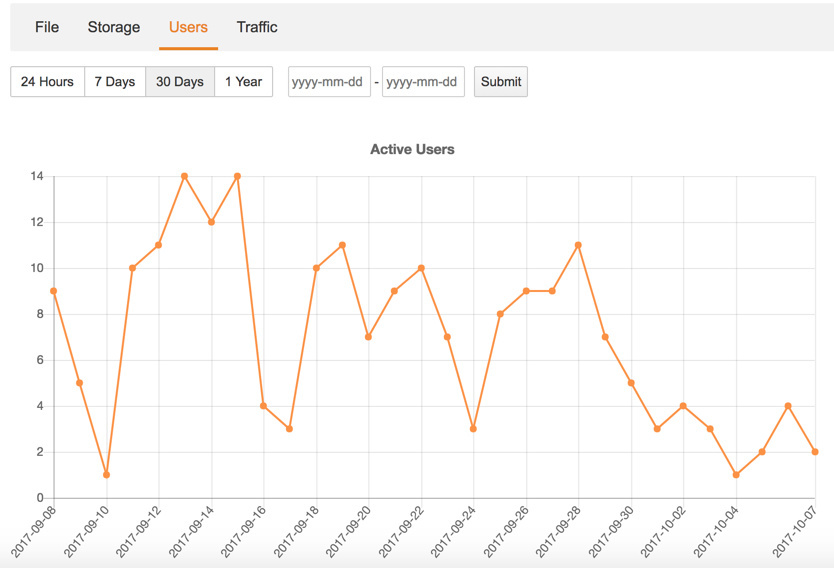
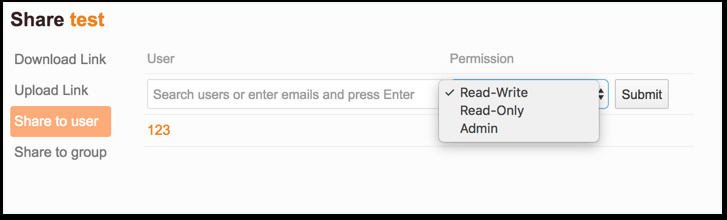
There are three major new features:
This feature is turned off by default, you need to turn on it by adding the following config to seafevents.conf.
[STATISTICS]
## must be "true" to enable statistics
enabled = true
Other changes include:
Add the ability of tagging a snapshot of a library (Use ENABLE_REPO_SNAPSHOT_LABEL = True to turn the feature on)
Add a field Reference ID to support changing users primary ID in Shibboleth or LDAP
[Admin] Add an option to enable users to share a library to any groups in the system.
Use WSGI as the default mode for deploying Seahub.
Use multi-threads in search indexing
Support adding a custom user search function (https://github.com/haiwen/seafile-docs/commit/115f5d85cdab7dc272da81bcc8e8c9b91d85506e )
Clean the list of languages
Improved performance of loading library list
[improve] Improve performance of file history page.
[improve] Show two file history records at least.
Support OAuth.
Support Swift v1 protocol.
Enable publish library update events to message queue (like Redis)
Other small UI improvements
Enjoy the new version!
To use the WSGI mode, two steps are needed:
Change the config file of Nginx/Apache.
Restart Seahub with ./seahub.sh start instead of ./seahub.sh start-fastcgi
The configuration of Nginx is as following:
location / {
         proxy_pass         http://127.0.0.1:8000;
         proxy_set_header   Host $host;
         proxy_set_header   X-Real-IP $remote_addr;
         proxy_set_header   X-Forwarded-For $proxy_add_x_forwarded_for;
         proxy_set_header   X-Forwarded-Host $server_name;
         proxy_read_timeout  1200s;

         # used for view/edit office file via Office Online Server
         client_max_body_size 0;

         access_log      /var/log/nginx/seahub.access.log;
         error_log       /var/log/nginx/seahub.error.log;
    }
The configuration of Apache is as following:
    # seahub
    SetEnvIf Authorization "(.*)" HTTP_AUTHORIZATION=$1
    ProxyPass / http://127.0.0.1:8000/
    ProxyPassReverse / http://127.0.0.1:8000/
The auto-start script for your Linux system need also be changed.
3 Likes
Just upgraded my test server from 6.0.8 to 6.2.2. Everything seems to be running fine, so far. The new statistics module works. Looks good.
Evgeny
December 13, 2017, 7:23am
4
Hi,
Default Admin
System Admin
Daily Admin
Audit Admin.
Whats about Swift v3.0 API support?
1 Like
lian
December 13, 2017, 8:35am
5
Seafile has four build-in admin roles:
default_admin, has all permissions.
system_admin, can only view system info and config system.
daily_admin, can only view system info, view statistic, manage library/user/group, view user log.
audit_admin, can only view system info and admin log.
All administrators will have default_admin role with all permissions by default.
If you set an administrator to some other admin role, the administrator will only have the permissions you configured to True .
Seafile supports eight permissions for now, its configuration is very like common user role, you can custom it by adding the following settings to seahub_settings.py.
ENABLED_ADMIN_ROLE_PERMISSIONS = {
    'system_admin': {
        'can_view_system_info': True,
        'can_config_system': True,
    },
    'daily_admin': {
        'can_view_system_info': True,
        'can_view_statistic': True,
        'can_manage_library': True,
        'can_manage_user': True,
        'can_manage_group': True,
        'can_view_user_log': True,
    },
    'audit_admin': {
        'can_view_system_info': True,
        'can_view_admin_log': True,
    },
    'custom_admin': {
        'can_view_system_info': True,
        'can_config_system': True,
        'can_view_statistic': True,
        'can_manage_library': True,
        'can_manage_user': True,
        'can_manage_group': True,
        'can_view_user_log': True,
        'can_view_admin_log': True,
    },
}
3 Likes
Evgeny
December 13, 2017, 9:05am
6
Hi, lian
BayerSe
December 13, 2017, 10:26am
8
Hi,
after the update from 6.1.3 to 6.2.2 I’m seeing this in the ccnet.log file:
[12/13/17 11:23:54] ../common/session.c(409): Accepted a local client
[12/13/17 11:23:54] ../common/ccnet-db.c(460): Error prepare statement SELECT e.id, e.email, is_staff, is_active, ctime, passwd, reference_id, role  FROM EmailUser e LEFT JOIN UserRole ON e.email = UserRole.email  WHERE e.email=?: mysql_stmt_prepare failed: Unknown column 'reference_id' in 'field list'.
Any advice?
lian
December 13, 2017, 10:29am
9
Have you run the upgrade script ?
1 Like
BayerSe
December 13, 2017, 10:41am
10
Good hint! I did a minor upgrade - running the correct upgrade script solved my issues. Thanks!
Hi, after upgrading from 6.1 at 6.2 seafevents don’t start.
[12/13/17 17:10:29] seafile-controller.c(574): pid file /home/seafile/seafile/pids/seafevents.pid does not exist
and my seafevents.log wth this:
[2017-12-13 17:12:19,798] [INFO] audit is enabled
every 10 senconds.
The Office-Preview don’t work anymore.
Sorry, we didn’t have time to support Swift v3.0 API yet. It will be delayed to version 6.3.
zming
December 14, 2017, 10:36am
14
@Subseven can you try mysql database?
How to change?
[DATABASE]
zming
December 15, 2017, 2:10am
16
[DATABASE]
#type = sqlite3
#path = /home/seafile/seafile/pro-data/seafevents.db
type = mysql
host = 127.0.0.1
username = root
password = [db password]
name=seafevent_db
Hi,
After upgrade from 6.2.1 to 6.2.2,
I get a 502 bad gateway after login with shibboleth.
Apache log is ;
[Fri Dec 15 11:06:40.361992 2017] [proxy:error] [pid 17815] (32)Broken pipe: [client 194.254.171.56:52991] AH01084: pass request body failed to 127.0.0.1:8000 (127.0.0.1), referer: https://idp.domain/idp/profile/SAML2/Redirect/SSO?execution=e2s1
[Fri Dec 15 11:06:40.362042 2017] [proxy_http:error] [pid 17815] [client 194.254.171.56:52991] AH01097: pass request body failed to 127.0.0.1:8000 (127.0.0.1) from 194.254.171.56 (), referer: https://idp.domain/idp/profile/SAML2/Redirect/SSO?execution=e2s1
If i restart Apache, shib login is sucessful
Regards
Same here.
@daniel.pan , as this wasn´t mentioned in the change log could you check on that please? I suppose it´s simply a bug.
The Pro edition is designed to be work with MySQL only.
2 Likes
Evgeny
December 18, 2017, 7:53am
20
Thank you. I will looking for 6.3 release.
Thanks for clarification but then I wonder why I got a different answer in March this year by email: ‘Our latest version support PostgreSQL too. We only don’t provide upgrade and setup scripts for PostgreSQL.’
One of my threads six months ago was also about the Pro version which was worked on and fixed .
hkunz
December 30, 2017, 12:26am
22
I upgraded from pro 6.1.8 to pro 6.2.4. I am using a seafile cluster (two applications servers, one background node) in combination with a real-time backup.
the upgrade worked almost perfectly. the only issue I see is, that the real-time backup server cannot load the repo-list anymore:
http-tx-mgr.c(514): libcurl failed to GET https://[primary server]/seafhttp/server-sync/repo-list: Problem with the SSL CA cert (path? access rights?).
My systems are running debian and I am aware of this:https://manual.seafile.com/deploy_pro/real_time_backup.html
specifically the part on bundling the ca-certificates.
did something change here? before the upgrade, the real-time backup was running fine (with the same server certificates).
or could this be caused by the switching from fastcgi to WSGI? (although as far as I understand this affects only the seahub service).
any hints aprreciated.
Best,