Hi @Barolo, thanks for the reply. I appreciate you taking the time. Here’s a little more on the subject:
First a visual look at what I’m doing. The Seafile containers are a few of many others running things like Wordpress, Ghost, and other tools (all on different domains). The NGINX (swag) container manages the renewal of these 16 different Letsencrypt certificates (including the one for Seafile).
As it turns out, I also have an old Seafile 6.3.4 container running on this very same docker server. NGINX (10.0.01) can resolve IPs and forwards to seafile (seafile.domain.com) with this seafile.conf file;
server {
    listen 443 ssl;
    listen [::]:443 ssl;

    server_name seafile.*;

    include /config/nginx/ssl.conf;

    client_max_body_size 0;

    location / {
        include /config/nginx/proxy.conf;
        resolver 127.0.0.1 valid=30s;
        proxy_pass https://seafile.domain.com/;
       proxy_set_header X-Scheme $scheme;
       proxy_set_header   Host $host;
       proxy_set_header X-Forwarded-Proto https;
    }

add_header Strict-Transport-Security "max-age=0; includeSubDomains";
}
That works great… files move back and forth, the Seafile client works. The only reason to move from it is that it’s 6.3.4 and I want to take advantage of the pro edition (including adding onlyoffice).
Now, as another example, I spun up a completely new server, installed docker and LET seafile take over everything and it is possible to get it all working. This configuration does not work, but as least with seafile as the only holder of port 443/80 config is possible.
So, coming back to the problem
Since the NGINX container is a different container than Seafile, it does not have visibility into the media directory (/shared in your example). Other examples I see are:
   location /media {
        root /var/seafile-server-latest/seahub;
    }
On my container I have the following volume mapped:
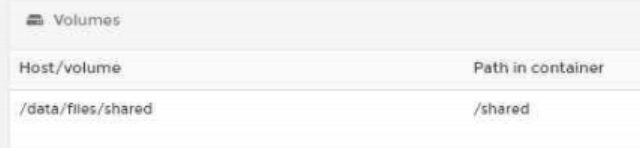
In addition, this directory will have to be mapped on the NGINX container. It would seem crazy is /shared is /var/seafile-server-latest/seahub in the Seafile example. Something I’ll have to test.


